

In this guide, we will break down what a Stack is, how it works behind the scenes, what operations it supports, and how to use the built-in C++ Standard Template Library (std::stack) in your own programs.
Part of the Stack Series: This article is Step 1 of our Stack in C++: Complete Beginner-to-Advanced Guide.
1. What Is a Stack?
A Stack is a linear data structure that stores a collection of elements in a strict sequential order. Unlike an array, where you can jump to any index at any time (arr[3]), a Stack restricts all insertions and removals to one single end, called the Top.
Abstract Data Structure vs. Concrete Implementation
Before writing code, it helps to separate two ideas that beginners often mix up:
- The Stack as an Abstract Data Type (ADT): This is the rulebook. Anything that follows the rule “you can only add, remove, or inspect the most recently added item” behaves as a Stack.
- The Concrete Implementation: This is the engine under the hood that actually holds the data in computer memory. You can build a Stack in C++ using a dynamic
vector, a fixed-size array, or a singly linked list.
No matter which underlying storage you choose, the behavior of the Stack from the outside remains identical.
2. Understanding LIFO (Last In, First Out)
A Stack operates on a principle called LIFO, which stands for Last In, First Out.
- Last In: The element that was placed into the stack most recently sits at the very top.
- First Out: Because the top blocks everything underneath it, that newest element must be the very first one removed.
Contrast with Queue: While a Queue follows FIFO (First In, First Out)—like people standing in a ticket line where the first person in line is served first—a Stack always serves the newest arrival first.
      PUSH (Insert)        POP (Remove)
           |                    ^
           v                    |
        +-----+
TOP --> |  30 |  <-- Last In (Added 3rd, Removed 1st)
        +-----+
        |  20 |      (Added 2nd, Removed 2nd)
        +-----+
        |  10 |  <-- First In (Added 1st, Removed 3rd)
        +-----+
        Bottom
If we insert 10, then 20, and then 30 into a Stack, 30 sits at the top. If we remove elements one by one, they come out in reverse order: 30, then 20, and finally 10.
3. Real-Life Examples of a Stack
You already interact with stacks every day in the physical world:
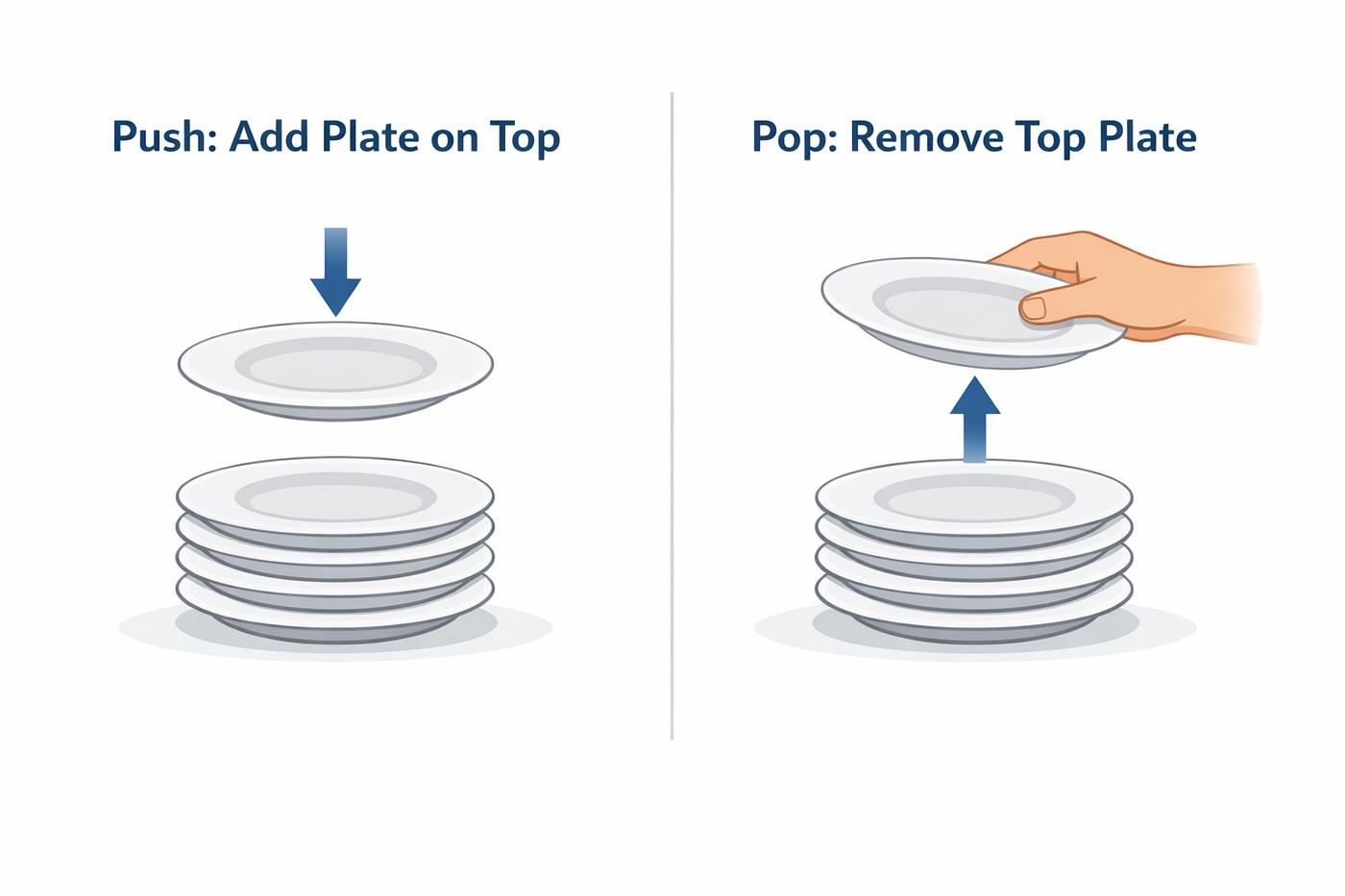
- A Stack of Cafeteria Plates: Clean plates are placed one on top of another. When a customer walks up, they take the plate from the top. Nobody pulls a plate from the bottom of the pile because the entire stack would collapse. The last plate washed and placed on the pile is the first plate taken.
- A Stack of Books on a Desk: If you stack three textbooks on a narrow desk—Math at the bottom, Physics in the middle, and C++ on top—you must lift the C++ book off the top before you can reach the Physics book.
- A Tube of Tennis Balls or Pringles Chips: The tube is closed at the bottom and open only at the top. The last ball pushed into the tube is the first ball that comes out when you open the lid.
4. How a Stack Works Internally
Internally, a Stack only needs two things to function:
- A storage container (such as a contiguous block of array slots or connected memory nodes) to hold the elements.
- A
toptracker (an integer index or a memory pointer) that always points to the most recently added item.
Let’s watch how the internal state changes as we add and remove numbers:
Step 1: Empty Stack        Step 2: push(10)          Step 3: push(20)
                           +----+                    +----+
                           |    |                    | 20 | <-- TOP
                           +----+                    +----+
                           | 10 | <-- TOP            | 10 |
+----+                     +----+                    +----+
(TOP = empty)

Step 4: push(30)           Step 5: pop()             Step 6: top()
+----+                     +----+                    +----+
| 30 | <-- TOP             |    |                    |    |
+----+                     +----+                    +----+
| 20 |                     | 20 | <-- TOP            | 20 | <-- TOP (Returns 20)
+----+                     +----+                    +----+
| 10 |                     | 10 |                    | 10 |
+----+                     +----+                    +----+
Notice a key rule: you cannot directly read or modify 10 while 20 and 30 are sitting above it. To reach 10, you must first pop 30 and 20. Because the computer never has to shift elements in the middle of the collection, every operation at the top happens almost instantaneously.
5. Fundamental Stack Operations
Every Stack implementation revolves around six core operations:
1. push(element)
Inserts a new element onto the top of the stack. The top marker moves up by one position to point to the newly added element.
numbers.push(10); // Places 10 on top of the stack
numbers.push(20); // Places 20 on top of 10
2. pop()
Removes the element currently sitting at the top of the stack. The top marker moves down to the previous element. Calling pop() on an empty stack causes an error known as Stack Underflow.
numbers.pop(); // Removes the topmost element (20)3. top() (also called peek())
Returns the value of the element at the top of the stack without removing it. This lets you inspect the newest element safely before deciding whether to pop it.
int newestValue = numbers.top(); // Reads the top element without removing it4. empty() (or isEmpty())
Checks whether the stack contains zero elements. It returns true if the stack is empty and false if at least one element is inside. You should always check empty() before calling top() or pop().
if (!numbers.empty()) {
    cout << "Top is: " << numbers.top() << endl;
}
5. size()
Returns the total number of elements currently stored in the stack.
cout << "Total elements: " << numbers.size() << endl;6. isFull() (Applicable to Fixed-Size Stacks)
When a stack is built using a fixed-size array, it has a maximum capacity. isFull() returns true when the stack has no room left. Trying to push() into a full stack causes Stack Overflow. (Dynamic stacks built with vector or a linked list grow automatically and rarely need isFull().)
if (myArrayStack.isFull()) {
    cout << "Stack Overflow! No more room." << endl;
}
6. Stack Implementation Overview
In C++, there are four common ways to work with a Stack:
| Implementation Method | Underlying Memory | Capacity | Best Used When |
|---|---|---|---|
1. C++ STL (std::stack) | Container adapter (uses std::deque by default) | Dynamic | Writing production code or solving competitive programming problems quickly. |
| 2. Stack Using Vector | Contiguous dynamic array (std::vector) | Dynamic | Learning how a resizable array backs a stack with high cache performance. |
| 3. Stack Using Array | Contiguous fixed-size array (int arr[MAX]) | Fixed | Learning index manipulation (top = -1) or working in strict memory environments. |
| 4. Stack Using Linked List | Non-contiguous heap nodes connected by pointers | Dynamic | Understanding pointers, dynamic memory (new/delete), and worst-case insertions. |
7. Stack Using C++ STL (std::stack)
For everyday programming, C++ provides a ready-to-use stack inside the <stack> header file.
Technically, std::stack is a container adapter. That means it wraps an existing sequential container (std::deque by default, though it can also wrap std::vector or std::list) and restricts its interface so that only LIFO stack functions are exposed.
Complete C++ Example Using std::stack
#include <iostream>
#include <stack>

using namespace std;

int main() {
    // 1. Create a stack that stores integers
    stack<int> numbers;

    // 2. Push elements onto the stack
    numbers.push(10);
    numbers.push(20);
    numbers.push(30);

    cout << "Current stack size: " << numbers.size() << endl;
    cout << "Top element is: " << numbers.top() << endl;

    // 3. Pop the top element (removes 30)
    numbers.pop();
    cout << "Top element after one pop: " << numbers.top() << endl;

    // 4. Print and empty the remaining stack using a loop
    cout << "Popping all remaining elements:" << endl;
    while (!numbers.empty()) {
        cout << numbers.top() << endl;
        numbers.pop();
    }

    // 5. Verify the stack is now empty
    if (numbers.empty()) {
        cout << "The stack is now completely empty." << endl;
    }

    return 0;
}
Output
Current stack size: 3
Top element is: 30
Top element after one pop: 20
Popping all remaining elements:
20
10
The stack is now completely empty.
8. Common Applications and Real-World Uses
Why do computer scientists care so much about such a simple structure? Because LIFO order naturally models nested processes, backtracking, and history reversal.
1. Function Calls and Recursion (The Call Stack)
Whenever main() calls function A(), and A() calls B(), your CPU must remember where to return after B() finishes. The operating system pushes an activation record (stack frame) onto the Call Stack for each function call. Because B() was called last, it finishes first and is popped off the stack first, returning control right back to A().
Call Order: main() -> A() -> B()

+------------------+
| Stack Frame: B() | <-- Currently executing (Popped 1st when B returns)
+------------------+
| Stack Frame: A() | <-- Paused (Resumes after B finishes)
+------------------+
| Stack Frame:main | <-- Paused (Resumes after A finishes)
+------------------+
2. Undo / Redo Functionality in Editors
When you type in a code editor or word processor, each action (typing a word, deleting a line, formatting text) is pushed onto an Undo Stack. When you press Ctrl + Z, the editor pops the most recent action off the Undo Stack, reverses it, and pushes it onto a Redo Stack.
3. Browser Back History
As you click links from Home Articles Stack Guide, your browser pushes each visited URL onto a history stack. Clicking the Back button pops the current page off the top and returns you to the exact page you visited immediately before.
4. Balanced Parentheses and Syntax Checking
Compilers use a stack to verify that every opening bracket (, {, or [ in your C++ source code is closed by the matching bracket in the right order. When an opening bracket appears, it is pushed onto the stack; when a closing bracket appears, the compiler checks whether it matches the bracket at top(). (We solve this exact problem in Top 5 Famous Stack Problems!)
5. Expression Evaluation and Conversion
Calculators and compilers use stacks to convert human-readable Infix math expressions like 3 + 4 * 2 into Postfix (Reverse Polish Notation) like 3 4 2 * +, and then evaluate the result without needing parentheses.
6. Depth-First Search (DFS) and Backtracking
When exploring a maze, a tree, or a graph using Depth-First Search, you plunge down one path as far as possible. When you hit a dead end, you backtrack to the most recent crossroads. A stack tracks the visited nodes so you can always retreat to the latest branching point.
9. Advantages and Disadvantages of a Stack
Advantages
- Blazing-Fast Operations: Inserting, removing, and inspecting the top element all run in constant time.
- Simple and Predictable: Restricting access to the top eliminates accidental corruption of earlier elements.
- Natural Fit for Reversal and Nesting: Any problem involving reversing order, matching nested pairs, or backtracking maps directly to LIFO.
Disadvantages
- No Random Access: You cannot access the -th element directly (
stack[i]is illegal). Reading the bottom element requires popping everything above it. - Searching Is Inefficient: Checking whether a specific value exists inside a stack requires popping elements one by one in time.
- Fixed Capacity Risk (Array Implementation): If implemented with a static array, choosing a size that is too small risks Stack Overflow, while choosing a size that is too large wastes memory.
10. Time and Space Complexity
In a properly implemented Stack, every fundamental operation touches only the top element. It never loops through the rest of the collection.
| Operation | Time Complexity | Explanation |
|---|---|---|
push(x) | Adds one element directly at the top position (amortized for vector). | |
pop() | Removes the element at the top position in a single step. | |
top() / peek() | Reads the element at the top position directly. | |
empty() | Compares the element count or top tracker against zero/empty. | |
size() | Returns the maintained count of elements. |
- Overall Space Complexity: , where is the number of elements stored in the stack, because memory grows linearly with the number of items pushed.
11. When Should You Use a Stack?
Ask yourself these three questions when designing a program or solving an algorithm problem:
- Do I need to process items in the exact reverse order of how they arrived? (If yes, push them onto a stack and pop them.)
- Does the most recent unmatched item need to be resolved first? (For example, matching inner parentheses before outer parentheses, or closing inner HTML tags before outer tags.)
- Do I need to remember a trail of decisions so I can backtrack to the most recent choice? (For example, Undo history, maze solving, or tree traversal.)
If the answer to any of these is yes, a Stack is almost certainly the right data structure for the job.
12. Frequently Asked Questions (FAQ)
Why does pop() not return the popped value in C++?
C++ separates top() (reading the value) and pop() (removing the element) for exception safety and performance. Returning a large object by value while simultaneously deleting it from the container could lose data if the object’s copy constructor throws an exception.
Can I iterate through a stack using a for loop?
No. By design, stack does not provide .begin() or .end() iterators because iterating across all elements violates the strict LIFO access rule. If you need both stack behavior and iteration, use a vector directly.
What is the difference between the Stack data structure and Stack memory (the Call Stack)?
The Stack data structure is a general-purpose container you create in your code to store data using LIFO rules. Stack memory (the Call Stack) is a dedicated region of RAM managed automatically by the CPU and operating system to store local variables and function return addresses—which happens to use the exact same LIFO Stack principle!
Summary
- A Stack is a linear data structure that follows LIFO (Last In, First Out).
- All additions (
push), removals (pop), and inspections (top) happen exclusively at one end called the Top. - Every core stack operation executes in constant time.
- For quick everyday coding, use
#include <stack>from the C++ STL. - To truly master how Stacks work under the hood, every C++ programmer should build one from scratch using a vector, an array, and a linked list.
Continue Learning in the Stack Series
Now that you understand how a Stack works conceptually, let’s build our own Stack from scratch!
- Topic Hub: Stack in C++: Complete Beginner-to-Advanced Guide
- Next Article (Step 2): Stack Using Vector in C++: Step-by-Step Implementation
- Step 3: Stack Using Array in C++: Fixed-Size Implementation & Dry Run
- Step 4: Stack Using Linked List in C++: Dynamic Node Implementation
- Step 5: Top 5 Famous Stack Problems in Competitive Programming