

Part 1 — Python Fundamentals
Welcome to the foundational chapter of the Python Programming Handbook. Whether you have never written a single line of code before or are transitioning from another language like C++, Java, or JavaScript, this guide will build your mental model of Python from the ground up with technical rigor and clarity.
Topics Covered in This Guide
- What is Python and Why Does It Matter? — History, design philosophy, and Python 2 vs 3.
- The Python Interpreter & Execution Model — Bytecode compilation, intermediate representation, and the CPython Virtual Machine (PVM).
- First Python Program & Output Formatting — Mastering
print(), parameter controls (sep,end,flush), and formatted output. - Syntax Rules: Comments, Indentation, and Statements — Significant indentation, block scopes, comments, and expressions vs statements.
- Variables & The Object Reference Model — Object allocation, dynamic vs strong typing, memory mechanics, and identifier naming rules.
- Fundamental Data Types & Type Conversion — Scalar types (
int,float,str,bool,NoneType), type conversion, and explicit casting. - User Input:
input()— Interactive terminal input, input sanitization, and type conversion. - Operators in Python — Arithmetic, assignment, comparison, logical short-circuiting, identity (
is), membership (in), and bitwise operators. - Operator Precedence Hierarchy — Evaluation order, PEMDAS rules, and comparison chaining.
- String Operations Essentials — Concatenation, replication, zero-based indexing, slicing (
[start:stop:step]), and f-strings. - Debugging & Common Beginner Mistakes — Reading tracebacks and diagnosing
SyntaxError,NameError,TypeError, andValueError. - Quick Reference & Summary — Core concepts, syntax summary table, and quick revision cards.
- Practice Problems (3 Levels) — Hands-on problem sets from beginner to challenge level with hints.
- Mini-Project: Terminal Bill Splitter & Currency Converter — Full interactive end-to-end Python project with solution code.
1. What is Python and Why Does It Matter?
1. What is it?
Python is a high-level, interpreted, dynamically-typed, garbage-collected, general-purpose programming language conceived by Guido van Rossum in 1989 and released in 1991. The language philosophy emphasizes code readability, developer ergonomics, and simplicity, summarized in the famous Zen of Python (import this).
2. Why does it matter?
Unlike low-level languages (such as C or Rust), where developers must manually allocate memory, manage pointers, and compile binaries for specific processor architectures, Python abstracts hardware-level complexities. This enables software engineers, data scientists, and DevOps practitioners to build robust solutions rapidly.
3. Python 2 vs Python 3
Python 2 reached its official End of Life (EOL) on January 1, 2020. Modern development is exclusively done in Python 3 (Python 3.10+ is the modern standard). Key differences include:
printis a statement in Python 2 (print "hello"), but a built-in function in Python 3 (print("hello")).- Python 3 handles all strings as Unicode (UTF-8) by default; Python 2 treated strings as ASCII bytes.
- Integer division: In Python 3,
5 / 2yields2.5(true float division). In Python 2,5 / 2yielded2(integer floor division).
2. The Python Interpreter & Execution Model
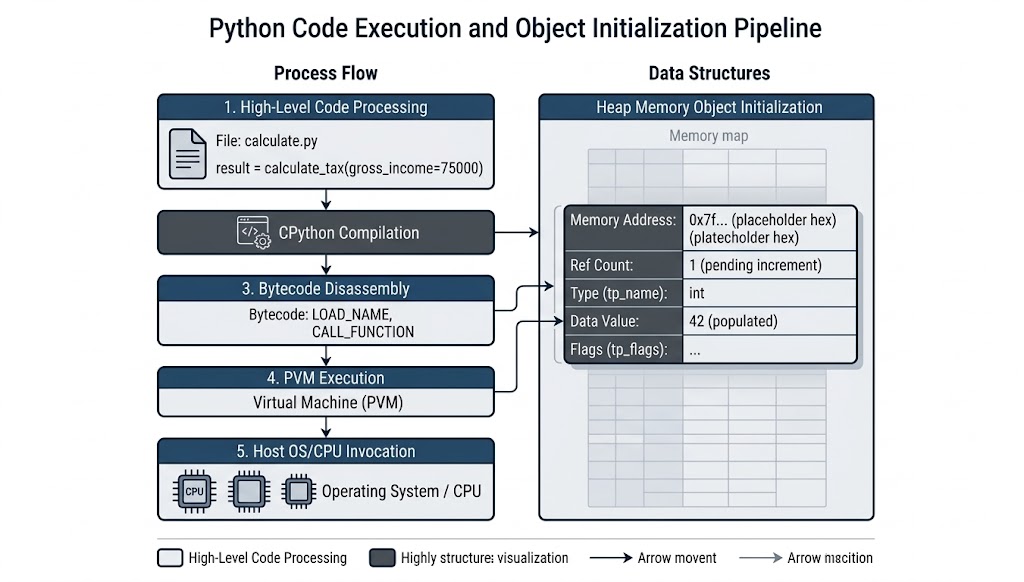
When you run a Python script, it is not converted directly to machine code like C/C++. Instead:
- Compilation: The CPython interpreter compiles source code (
.py) into intermediate bytecode instructions (stored in__pycache__/*.pyc). - Execution: The Python Virtual Machine (PVM) reads the bytecode loop and executes platform-independent instructions on your CPU.
3. First Python Program & Output Formatting
1. What is it?
The print() function is the primary tool to output text, variables, and evaluated expressions to standard output (sys.stdout).
2. Syntax & Parameters
print(*objects, sep=' ', end='\n', file=None, flush=False)*objects: One or more items to print.sep: String inserted between values (default: single space' ').end: String appended at the very end (default: newline'\n').flush: Boolean specifying if the output stream is forcibly flushed immediately.
3. Code Examples
# 1. Basic output
print("Hello, World!")

# 2. Printing multiple values with a custom separator
first_name = "Shafin"
last_name = "Chowdhury"
print(first_name, last_name, sep=" - ")
# Output: Shafin - Chowdhury

# 3. Changing line termination (preventing newline)
print("Loading", end="...")
print("Done!")
# Output: Loading...Done!

# 4. CSV-like output
print("apple", "banana", "cherry", sep=", ")
# Output: apple, banana, cherry
4. Syntax Rules: Comments, Indentation, and Statements
1. Comments
Comments are ignored by the interpreter and explain the why, not the what.
# Single-line comment: Explains intention
salary = 85000  # Inline comment

"""
Multi-line string used as documentation.
When not assigned to a variable, the interpreter discards it,
though docstrings inside functions/classes have special semantics.
"""
2. Significant Indentation
Unlike C-style languages that use curly braces {} to designate code blocks, Python uses whitespace indentation.
- Rule: Standard indentation is exactly 4 spaces per block level (never mix tabs and spaces).
age = 20

if age >= 18:
    print("Eligible to vote")
    print("Welcome to adulthood")
else:
    print("Minor")
3. Statements vs Expressions
- Expression: Any piece of code that evaluates to a value (e.g.,
4 * 5,len("cat"),x > 10). - Statement: An executable action that does something (e.g., assignment
x = 10,if,while,import).
5. Variables & The Object Reference Model
1. What is a Variable?
In languages like C or Java, a variable is a named memory box holding a raw value. In Python: Variables are names (labels) bound to objects stored in memory.
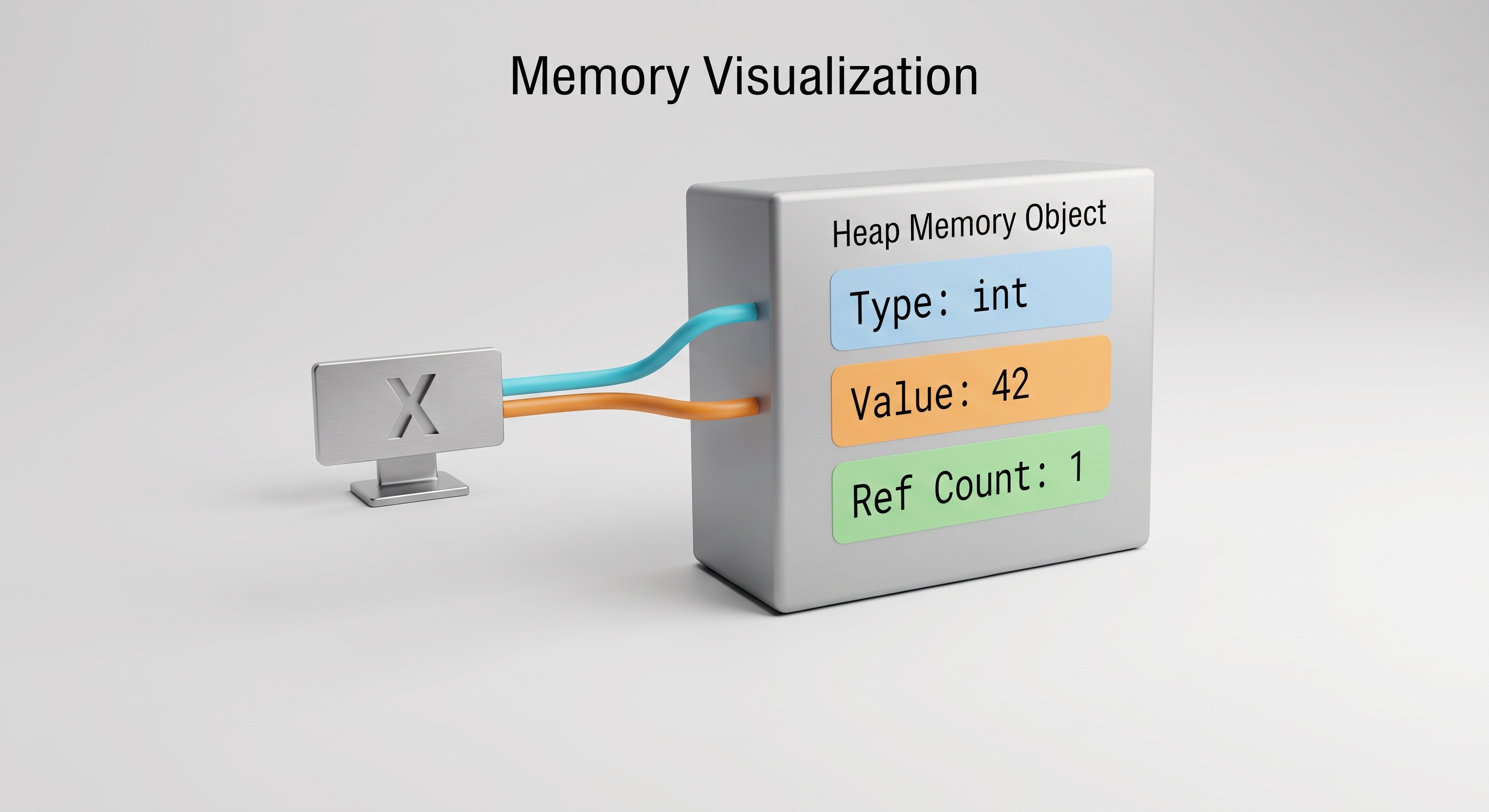
When you write y = x, you do not duplicate 42. Both x and y reference the exact same object in memory.
2. Dynamic vs Strong Typing
Dynamic Typing (Types determined at runtime):
# Variable can reference different types over time
data = 100        # data references an int
print(type(data))  # <class 'int'>

data = "Active"   # data now references a str (legal)
print(type(data))  # <class 'str'>
Strong Typing (Types strictly enforced):
# Python will not implicitly cast incompatible types
total = "50" + 5
# Raises: TypeError: can only concatenate str (not "int") to str

# In JavaScript, this evaluates silently to "505".
# Python refuses to guess.
3. Variable Naming Rules
In Python, variable names (identifiers) must follow strict syntax rules enforced by the interpreter:
Lexical Rules for Identifiers:
- Allowed Characters: May only contain letters (
a-z,A-Z), digits (0-9), and underscores (_). - Cannot Start with a Digit: Must begin with a letter or underscore, never a number (e.g.,
user1is valid;1userraises aSyntaxError). - Case-Sensitive:
age,Age, andAGEare three distinct variables referencing different memory locations. - Cannot Be a Reserved Keyword: Cannot use any of Python’s 35 reserved keywords (
if,def,class,for,while,return, etc.). - No Spaces or Special Characters: Punctuation and symbols (
@,$,%,-,!,?,.etc.) are forbidden (e.g.,user-nameis parsed asuser - namesubtraction).
Valid vs. Invalid Variable Names:
| Variable Identifier | Validity | Explanation / Consequence |
|---|---|---|
user_age | Valid | Uses lowercase letters and underscores |
_temp_cache | Valid | Starting with an underscore is allowed |
totalScore2 | Valid | Digits are allowed after the first character |
MAX_LIMIT | Valid | Uppercase letters and underscores are allowed |
2nd_user | Invalid | Cannot begin with a digit (SyntaxError: invalid decimal literal) |
user-name | Invalid | Hyphen is interpreted as a minus operator (SyntaxError or NameError) |
user name | Invalid | Whitespace is not allowed inside identifiers (SyntaxError) |
class | Invalid | class is a reserved language keyword (SyntaxError: invalid syntax) |
email@address | Invalid | @ symbol is not permitted in identifier names (SyntaxError) |
Check Python’s reserved keywords dynamically:
import keyword
print(keyword.kwlist)
6. Fundamental Data Types & Type Conversion
1. Fundamental Scalar Data Types
Python provides five primary built-in scalar data types:
| Data Type | Formal Name | Description | Mutability | Example Literals | Default / Falsy Value |
|---|---|---|---|---|---|
int | Integer | Whole numbers with arbitrary precision (unlimited size) | Immutable | 42, -10, 1_000_000, 0xFF | 0 |
float | Floating-point | Double-precision real numbers (IEEE-754 64-bit) | Immutable | 3.14159, -0.001, 1e-4 | 0.0 |
str | String | Ordered sequence of Unicode text characters | Immutable | 'hello', "python", """multi""" | "" (empty string) |
bool | Boolean | Logical truth flag (True or False) | Immutable | True, False | False |
NoneType | None | Null sentinel indicating absence of value | Immutable | None | None |
2. Type Conversion vs Type Casting
| Feature / Aspect | Implicit Type Conversion (Coercion) | Explicit Type Conversion (Type Casting) |
|---|---|---|
| Definition | Automatic data type conversion performed by Python | Manual conversion deliberately performed by the programmer |
| How it happens | Automatic: Python handles the conversion during an operation | Manual: Programmer uses conversion functions such as int(), float(), str(), etc. |
| Code Requirement | No extra conversion code is required | Must explicitly call a conversion function |
| Data Loss Risk | Generally no data loss when converting int to float | Possible: e.g., int(3.99) converts the value to 3 |
| When it occurs | Mainly during operations involving compatible numeric types | Common when converting user input, strings, API data, files, etc. |
| Example | a = 2; b = 4.23res = a + b # 6.23 (float) | a = "2"; b = 3.33res = float(a) + b # 5.33 (float) |
| Failure Behavior | Incompatible operations raise TypeError, e.g. "5" + 2 | Invalid conversion formats can raise ValueError, e.g. int("s") |
3. Type Casting Functions Reference Table
| Target Function | Target Type | Accepts Input Types | Example Input | Converted Output | Potential Error / Pitfall |
|---|---|---|---|---|---|
int(x) | int | float, numeric str, bool | int("42")int(7.99)int(True) | 427 (truncated)1 | ValueError if the string is invalid or contains a decimal point: int("s"), int("3.14") |
float(x) | float | int, numeric str, bool | float("3.14")float(5)float(False) | 3.145.00.0 | ValueError if the string is non-numeric: float("abc") |
str(x) | str | Any Python object | str(100)str(3.14)str(True) | "100""3.14""True" | Generally safe: Python objects have a string representation |
bool(x) | bool | Any Python object | bool(1)bool(0)bool("")bool("hello") | TrueFalseFalseTrue | Uses truthiness: 0, None, False, and empty containers/strings are falsy |
4. Code Examples: Conversion vs Casting
# 1. Implicit Conversion (Automatic)
a = 2      # int
b = 4.23   # float
sum_auto = a + b  # 'a' is automatically promoted to float
print("Implicit conversion result:", sum_auto, type(sum_auto))
# Output: Implicit conversion result: 6.23 <class 'float'>

# 2. Incompatible Types require Manual Casting
a_str = "2"
b_float = 3.33
# sum_err = a_str + b_float
# Raises: TypeError: can only concatenate str (not "float") to str

# Casting 'a_str' to float resolves the operation:
sum_casted = float(a_str) + b_float
print("Manual casting result:", sum_casted)  # 5.33

# 3. Truncation when casting float to int
pi = 3.99
print("Truncated float:", int(pi))  # 3 (truncates towards zero, does not round)

# 4. Invalid Casting Error
# a_char = "s"
# sum_fail = int(a_char) + 2
# Raises: ValueError: invalid literal for int() with base 10: 's'
7. User Input: input()
1. What is it?
The input() function pauses program execution, displays an optional prompt to standard output, and captures user keystrokes until the Enter key is pressed.
Warning:
input()ALWAYS returns a string (str), even if the user types numbers.
❌ Common Mistake (TypeError):
age_raw = input("Enter your age: ")
# Raises TypeError: can only concatenate str (not "int") to str
next_year = age_raw + 1
✅ Proper Type Sanitization & Casting:
age = int(input("Enter your age: "))
print("Next year you will be:", age + 1)
8. Operators in Python
1. Arithmetic Operators
a = 15
b = 4

print(a + b)   # Addition: 19
print(a - b)   # Subtraction: 11
print(a * b)   # Multiplication: 60
print(a / b)   # True Float Division: 3.75
print(a // b)  # Floor Division (quotient): 3
print(a % b)   # Modulo (remainder): 3
print(a ** b)  # Exponentiation (15^4): 50625
2. Assignment & Augmented Assignment
x = 10
x += 5   # Equivalent to: x = x + 5 (15)
x *= 2   # Equivalent to: x = x * 2 (30)
x //= 4  # Equivalent to: x = x // 4 (7)
x %= 3   # Equivalent to: x = x % 3 (1)
x **= 3  # Equivalent to: x = x ** 3 (1)
3. Comparison (Relational) Operators
Always evaluate to a boolean (True or False).
p = 10
q = 20

print(p == q)  # Equal to: False
print(p != q)  # Not equal to: True
print(p > q)   # Greater than: False
print(p < q)   # Less than: True
print(p >= 10) # Greater than or equal: True
print(p <= 20) # Less than or equal: True

# Chained comparisons (Pythonic feature)
age = 25
print(18 <= age < 65)  # True (18 <= age and age < 65)
4. Logical Operators & Short-Circuit Evaluation
Keywords: and, or, not.
x and y: Returnsxifxis false, otherwisey.x or y: Returnsxifxis true, otherwisey.not x: ReturnsTrueifxis false, otherwiseFalse.
# Short-Circuiting Example:
def dangerous_computation():
    print("This will crash!")
    return 1 / 0

is_admin = False
# Because is_admin is False, second operand is NEVER run!
can_access = is_admin and dangerous_computation()
print(can_access)  # False (no crash occurred)
5. Identity Operators: is vs ==
==checks for equality of values.ischecks for identity (exact same memory address).
list_a = [1, 2, 3]
list_b = [1, 2, 3]

print(list_a == list_b)  # True  (same values)
print(list_a is list_b)  # False (distinct memory objects)

# Best practice with 'is': comparing with None or bool
status = None
if status is None:
    print("No status specified")
6. Membership Operators: in and not in
Tests whether a value exists inside a sequence (string, list, tuple, etc.).
message = "Python is powerful"
print("Python" in message)      # True
print("Java" not in message)    # True

fruits = ["apple", "banana", "cherry"]
print("banana" in fruits)       # True
print("grape" not in fruits)    # True
7. Bitwise Operators
Operate directly on the binary representations of integers:
x = 0b1100  # 12 in decimal
y = 0b1010  # 10 in decimal

print(bin(x & y))   # Bitwise AND: 0b1000 (8)
print(bin(x | y))   # Bitwise OR:  0b1110 (14)
print(bin(x ^ y))   # Bitwise XOR: 0b0110 (6)
print(bin(~x))      # Bitwise NOT: -13 (two's complement)
print(x << 2)       # Bitwise Left Shift: 48 (multiply by 2^2)
print(x >> 1)       # Bitwise Right Shift: 6 (divide by 2^1)
9. Operator Precedence Hierarchy
When multiple operators appear in a single expression, Python evaluates them in order of precedence:
| Level | Operator Category | Operators | Associativity |
|---|---|---|---|
| 1 (Highest) | Parentheses | () | Left-to-right |
| 2 | Exponentiation | ** | Right-to-left |
| 3 | Unary Positive, Negative, Bitwise NOT | +x, -x, ~x | Right-to-left |
| 4 | Multiplication, Division, Floor Division, Modulo | *, /, //, % | Left-to-right |
| 5 | Addition, Subtraction | +, - | Left-to-right |
| 6 | Bitwise Shifts | <<, >> | Left-to-right |
| 7 | Bitwise AND | & | Left-to-right |
| 8 | Bitwise XOR, OR | ^, | | Left-to-right |
| 9 | Comparisons, Identity, Membership | ==, !=, <, <=, >, >=, is, in | Left-to-right |
| 10 | Logical NOT | not | Right-to-left |
| 11 | Logical AND | and | Left-to-right |
| 12 (Lowest) | Logical OR | or | Left-to-right |
Tip: Never rely on memorized precedence in ambiguous expressions. Use explicit parentheses:
(a + b) * (c - d).
10. String Operations Essentials
Strings in Python are ordered, immutable sequences of Unicode characters.
greeting = "Hello, Python!"

# 1. Length
print(len(greeting))  # 14

# 2. Indexing (0-indexed from start, -1 from end)
print(greeting[0])   # 'H'
print(greeting[-1])  # '!'

# 3. Slicing: [start:stop:step]
print(greeting[0:5])    # 'Hello' (stops before index 5)
print(greeting[7:])     # 'Python!'
print(greeting[::-1])   # '!nohtyP ,olleH' (reversal)

# 4. Common Methods
raw_input = "   shafin@example.com  \n"
clean_email = raw_input.strip().lower()
print(clean_email)  # "shafin@example.com"
11. Debugging & Common Beginner Mistakes
1. Reading a Traceback
When Python encounters an error, it prints a traceback. Always read it from bottom to top:
Traceback (most recent call last):
  File "app.py", line 12, in <module>
    total = calculate_bill(subtotal, tax_rate)
  File "app.py", line 4, in calculate_bill
    return subtotal + (subtotal * tax_rate)
TypeError: can't multiply sequence by non-float of type 'str'- Bottom line: Tells you the exact error type (
TypeError) and reason (can't multiply sequence by non-float). - File and line:
app.py, line 4 insidecalculate_bill. - Diagnosis:
subtotalortax_rateis a string instead of a float/integer.
2. The 4 Classic Beginner Mistakes
1. Assigning with = instead of checking with ==
# SyntaxError in Python (unlike C):
# if x = 10: ...

if x == 10:
    print("Equal")
2. Forgetting to cast input()
# items = input("Count: ") + 5 -> Raises TypeError
items = int(input("Count: ")) + 5
print("Total items:", items)
3. Indentation Inconsistency
# IndentationError: unexpected indent
def greet():
    name = "Shafin"
      print(name)  # ❌ Inconsistent spaces!
4. Attempting to mutate a string
word = "Python"
# word[0] = "J" -> Raises TypeError: 'str' object does not support item assignment

word = "J" + word[1:]  # ✅ Creates new string: "Jython"
Summary
- Python code compiles to bytecode before being executed on the CPython Virtual Machine.
- Variables are names bound to objects in memory; Python is dynamically and strongly typed.
- Variables follow PEP 8 snake_case; constants use SCREAMING_SNAKE_CASE.
- Operators obey strict precedence;
istests pointer/object identity while==tests value equality. input()returns raw string data that must be explicitly cast usingint()orfloat().- Tracebacks provide line numbers and diagnostic messages to trace bugs systematically.
Quick Reference
| Action | Syntax | Example |
|---|---|---|
| Print with separator | print(a, b, sep='-') | print("2026", "09", "22", sep="-") |
| Take integer input | int(input(prompt)) | age = int(input("Age: ")) |
| Check object identity | var is None | if response is None: |
| Exponentiation | base ** exp | 2 ** 8 # 256 |
| Floor division | a // b | 7 // 2 # 3 |
| Modulo (remainder) | a % b | 7 % 2 # 1 |
| String reversal | s[::-1] | "abc"[::-1] # "cba" |
Practice Problems
Level 1 — Basic
- Write a script that prompts for your first name and birth year, calculates your approximate age in 2026, and prints:
"Hello <Name>, you will turn <Age> in 2026." - Evaluate
result = 10 + 2 * 3 ** 2 / (4 - 2)by hand, noting operator precedence, then verify in Python.
Level 2 — Intermediate
- Write a program that takes an integer total number of seconds (e.g.,
7385) and breaks it down into hours, minutes, and remaining seconds using floor division//and modulo%. - Demonstrate short-circuit evaluation: construct a condition
condition = (len(username) > 0) and (username[0] != '_')that safely handles an empty stringusername = ""without crashing with anIndexError.
Level 3 — Challenge
- Write a bitwise program that takes an 8-bit integer (0 to 255) and checks whether the 3rd bit (0-indexed from right, weight ) is set (1) or unset (0) using bitwise AND
&and shift>>.
Hints
- Problem 3: Total hours is
seconds // 3600. Remainder isseconds % 3600. Minutes from that remainder isrem // 60. - Problem 4: Because Python’s
andshort-circuits, iflen(username) > 0evaluates toFalse, the right-hand sideusername[0]is never evaluated. - Problem 5: Create a mask
mask = 1 << 3. Evaluatebool(value & mask).
Mini-Project: Interactive Terminal Bill Splitter & Currency Converter
Here is a complete, executable Python program combining everything learned in Part 1. Save it as bill_splitter.py and run it:
"""
Part 1 Mini-Project: Utility Bill & Expense Splitter
Demonstrates: variables, types, input sanitization, arithmetic operators,
formatted output, and string manipulation.
"""

print("=" * 50)
print("     ENTERPRISE EXPENSE & BILL SPLITTER CLI     ")
print("=" * 50)

# Step 1: Collect inputs
service_name = input("Enter description of service/bill: ").strip()
raw_subtotal = input("Enter total bill amount ($): ")
raw_tax_rate = input("Enter tax rate percentage (e.g. 8.5 for 8.5%): ")
raw_tip_rate = input("Enter tip rate percentage (e.g. 15 for 15%): ")
raw_people_count = input("Enter number of people splitting: ")

# Step 2: Explicit Type Conversions
subtotal = float(raw_subtotal)
tax_rate = float(raw_tax_rate) / 100.0
tip_rate = float(raw_tip_rate) / 100.0
people_count = int(raw_people_count)

# Step 3: Arithmetic Calculations
tax_amount = subtotal * tax_rate
tip_amount = subtotal * tip_rate
grand_total = subtotal + tax_amount + tip_amount
share_per_person = grand_total / people_count

# Step 4: Display Formatted Invoice
print("\n" + "-" * 50)
print("               INVOICE SUMMARY                  ")
print("-" * 50)
print("Service/Item      :", service_name.upper())
print("Subtotal          :", f"${subtotal:,.2f}")
print("Tax Amount        :", f"${tax_amount:,.2f}", f"({raw_tax_rate}%)")
print("Tip Amount        :", f"${tip_amount:,.2f}", f"({raw_tip_rate}%)")
print("-" * 50)
print("Grand Total       :", f"${grand_total:,.2f}")
print("Party Size        :", people_count, "person(s)")
print("Each Person Pays  :", f"${share_per_person:,.2f}")
print("=" * 50)
print("Thank you for using Expense Splitter CLI!")
What Comes Next?
In Part 2 — Control Flow and Core Data Structures, we transition from linear execution to dynamic logic. You will master branching (if/elif/else), looping paradigms (for, while, loop else), and deep-dive into Python’s primary collections: list, tuple, set, dict, and their powerful comprehensions.
Follow the full curriculum on the Python Architecture & Core Mechanics topic hub.