

Part 2: Classes and Objects — Building Your First Java Class
In the previous part, Part 1: Object-Oriented Programming in Java: A Complete Story for Students, we learned the idea behind Object-Oriented Programming and why we use it. In this chapter, we’ll start writing actual OOP programs in Java.
By the end of this chapter, you’ll know how to:
- Create a class
- Create objects
- Access variables and methods
- Initialize objects using constructors
- Understand the
thiskeyword - Use
staticmembers correctly
Step 1: Creating a Class

Imagine an architect drawing the blueprint of a house.
The blueprint describes:
- How many rooms the house has
- Where the doors and windows are
- The size of the kitchen
- The electrical wiring
From that single blueprint, builders can construct hundreds of houses. Every house follows the same design, but each one is completely independent. Painting one house blue doesn’t change the others.
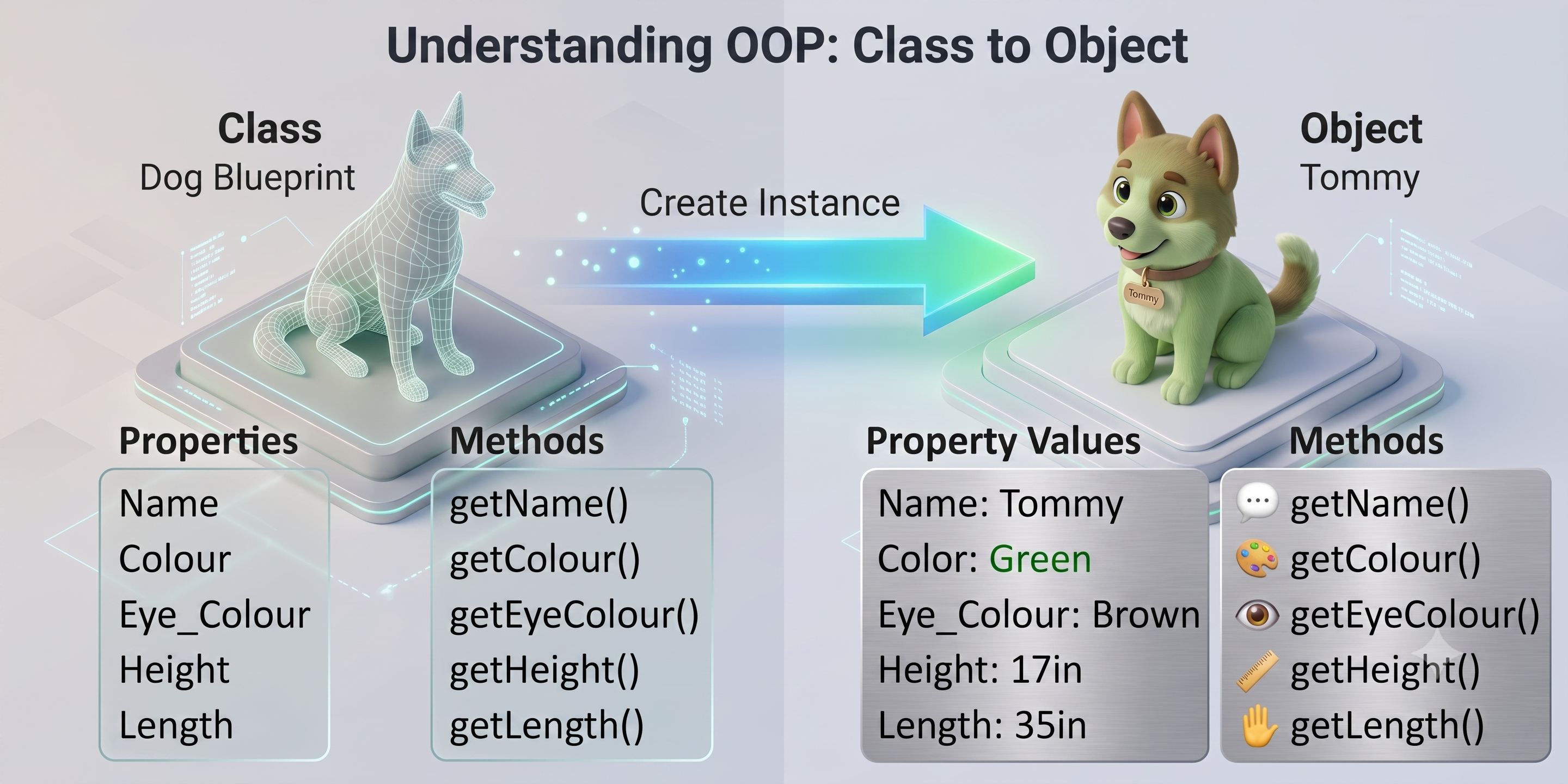
Java works exactly the same way.
- The blueprint is called a Class.
- Each actual house is called an Object (also known as an Instance).
What is a Class?
A class is a user-defined blueprint or template that defines the attributes (data) and methods (behaviors) that objects of that type will have. A class does not occupy memory on its own, it is just a description.
A class itself does not create any object or store data for individual objects. It only describes what an object should look like.
Let’s create a simple Student class.
class Student {

    // Attributes (Instance Variables)
    String name;
    int age;
    double gpa;

    // Method
    void introduce() {
        System.out.println("Hi! I am " + name);
    }

    // Another Method
    void study(String subject) {
        System.out.println(name + " is studying " + subject);
    }

}
When Java reads this class, it does not create any students.
Instead, Java simply learns:
Every
Studentobject will have aname,age,gpa, and can call the methodsintroduce()andstudy().
Actual students will only be created later using the new keyword.
Keep in Mind
- A class is not an object.
- A class does not store data for individual objects.
- Think of it as a blueprint or design.
Step 2: Creating Objects
What is an Object?
An object is an actual instance of a class. When an object is created, Java allocates memory for it and gives it its own copy of the class’s instance variables. Here the object will follow the template of it’s class. Means here we create an actual student.
Multiple objects created from the same class are completely independent of one another.
How to Create an Object
General syntax:
ClassName objectName = new ClassName();Example:
Student student1 = new Student();Let’s understand each part.
| Code | Meaning |
|---|---|
Student | The class (data type) (blueprint) |
student1 | Reference variable that stores the object |
new | Allocates memory for a new object |
Student() | Calls the constructor |
When Java executes this line, it performs four steps automatically:
- Allocates memory for a new object.
- Creates a
Studentobject. - Calls the constructor.
- Stores the object’s reference inside
student1.
Initially, the object looks something like this:
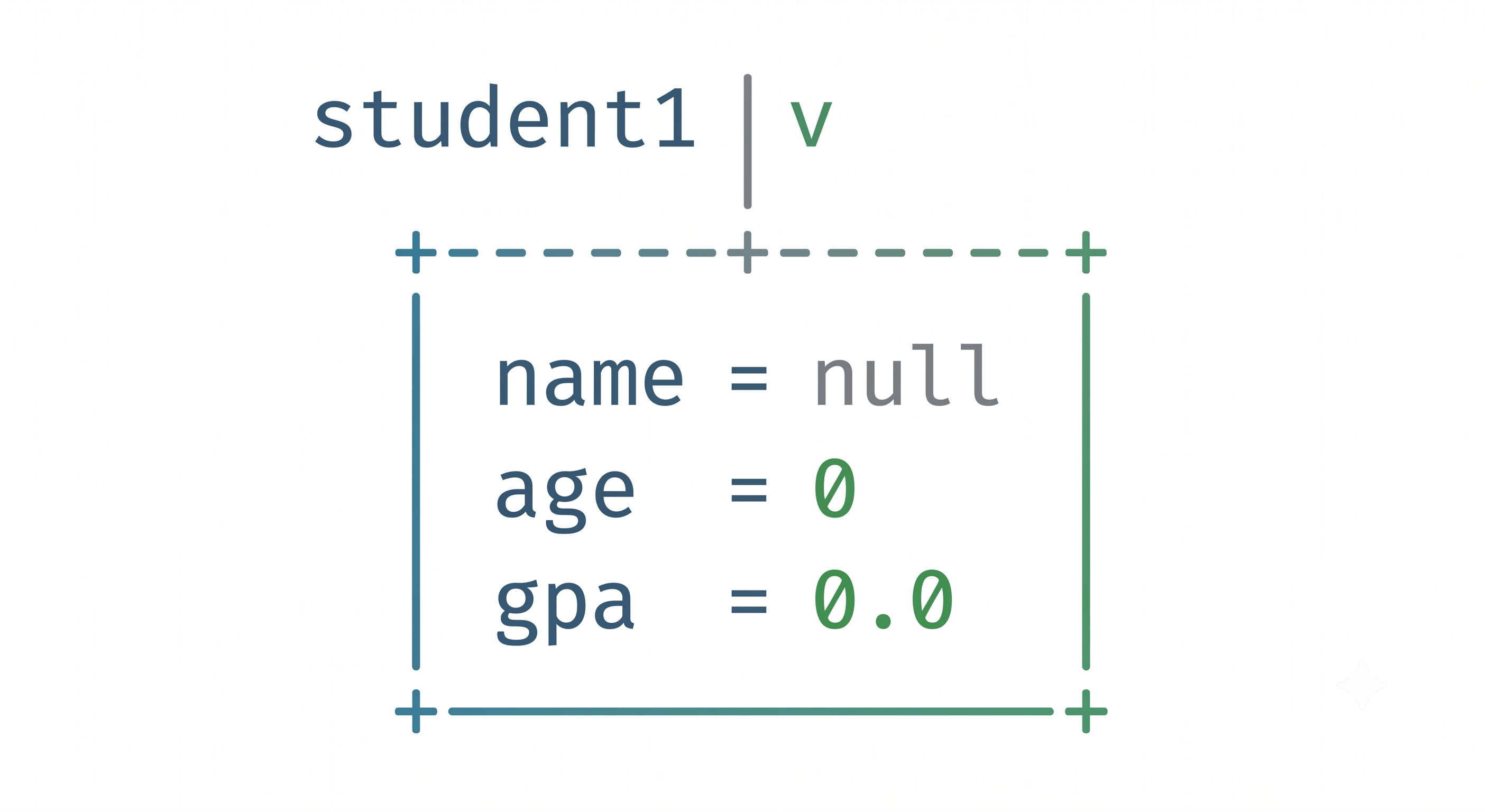
Every object gets its own separate copy of these variables.
Step 3: Accessing Variables (Attributes)
Once the object exists, we can access its variables using the dot (.) operator.
The general syntax is:
objectName.variableNamestudent1.name = "Ayasha";
student1.age = 20;
student1.gpa = 3.8;Reading values works exactly the same way.
System.out.println(student1.name);Output:
AyashaKeep in Mind
Use the object name, not the class name.
Correct:
student1.nameIncorrect:
Student.name(Unless the variable is static, which we’ll discuss later.)
Step 4: Calling Methods
Methods are also accessed using the dot operator.
student1.introduce();Output:
Hi! I am AyashaMethods can also accept parameters.
student1.study("Data Structures");Output:
Ayasha is studying Data StructuresGeneral syntax:
objectName.methodName(arguments);Examples:
student1.introduce();
student1.study("Algorithms");Step 5: Creating Multiple Objects
One class can create many objects.
Student student1 = new Student();
Student student2 = new Student();Assign different values.
student1.name = "Ayasha";
student2.name = "Rafi";Now call their methods.
student1.introduce();
student2.introduce();Output:
Hi! I am Ayasha
Hi! I am RafiNotice that every object has its own copy of the variables.
Changing
student1.gpa = 4.0;does not affect
student2.gpabecause they are separate objects built from the same blueprint.
Step 6: Constructors — Initializing Objects
Look carefully at this statement.
Student student1 = new Student();Whenever Java encounters
new Student()it has to prepare a brand-new object. This preparation includes allocating memory and assigning initial values to the object’s variables. The special method responsible for this initialization is called a constructor.
What is a Constructor?
A constructor is a special method that is automatically called whenever an object is created using the new keyword. Its primary purpose is to initialize the object’s attributes.
A constructor:
- Has the same name as the class.
- Has no return type.
- Is called automatically.
- Runs once for every object created.
Example:
class Student {
String name;
int age;
double gpa;
// constractor
Student() {
name = "Unknown";
age = 0;
gpa = 0.0;
System.out.println("A new Student object has been created.");
}
}Now,
Student student1 = new Student();automatically prints
A new Student object has been created.and initializes
name = Unknown
age = 0
gpa = 0.0without writing any additional code.
Step 7: Parameterized Constructors
The default constructor always assigns the same values. Most of the time, however, every object should have different information. Without a parameterized constructor, we’d write
Student student1 = new Student();
student1.name = "Ayasha";
student1.age = 20;
student1.gpa = 3.8;This becomes repetitive when creating many objects.
Instead, we can pass the values directly while creating the object.
Student student1 = new Student("Ayasha", 20, 3.8);But for that we have to pass this variables inside the Constructor, which is called parameterized constructors:
class Student {

    String name;
    int age;
    double gpa;
    // here we define the constructor with parameter.
    Student(String name, int age, double gpa) {

        this.name = name; // next part we will learn about this keyword
        this.age = age;
        this.gpa = gpa;

    }

}
Now creating multiple students becomes much cleaner.
Student s1 = new Student("Ayasha", 20, 3.8);
Student s2 = new Student("Rafi", 22, 3.5);
Student s3 = new Student("Mim", 21, 3.9);
Step 8: Understanding the this Keyword
Inside the constructor,
Student(String name) {
    name = name;
}
This doesn’t work as expected.
Why?
Because there are two variables named name.
The parameter:
String nameand the instance variable:
String name;Java cannot determine which one you mean.
So we use this.
this.name = name;Meaning:
this.name   → the object's variable

name        → the constructor parameter
The keyword this refers to the current object—the object whose constructor or method is currently executing.
Whenever constructor parameters have the same names as instance variables, using this avoids ambiguity.
Step 9: Static Members
So far, every variable belonged to an object.
For example,
name
age
gpa
Every student has different values. But sometimes information belongs to the entire class rather than a single object. Suppose a school wants to know how many students have been created in total. That number doesn’t belong to one specific student—it belongs to the Student class itself.
This is where static comes in.
What is static?
A static field or method belongs to the class itself, not to any particular object. All objects of the class share the same static field. You access static members using the class name, not an object reference. All objects share the same static variable.
Example:
class Student {

    String name;

    static int totalStudents = 0;

    Student(String name) {
        this.name = name;
        totalStudents++;
    }

}
Every time a new object is created,
totalStudents++;runs automatically.
Now,
Student s1 = new Student("Ayasha");
Student s2 = new Student("Rafi");
Student s3 = new Student("Mim");
The value of
Student.totalStudentsbecomes
3Notice that totalStudents is not copied into every object.
There is only one shared variable for the entire class.
Every object sees the same value.
Static Methods
Methods can also be static.
class Student {

    static int totalStudents = 0;

    static void printTotalStudents() {
        System.out.println("Total Students: " + totalStudents);
    }

}
Since the method belongs to the class, we call it using the class name.
Student.printTotalStudents();No object is required.
Instance Members vs Static Members
| Instance Members | Static Members |
|---|---|
| Belong to an object | Belong to the class |
| Every object has its own copy | Only one copy exists |
| Access using an object | Access using the class name |
Example: name, age, gpa | Example: totalStudents |
A complete java code example
// Student.java
class Student {
    // Attributes (Instance variables)
    String name;
    int age;
    double gpa;

    // Static field — shared across ALL Student objects
    static int totalStudents = 0;

    // Default constructor
    public Student() {
        this.name = "Unknown";
        this.age = 0;
        this.gpa = 0.0;
        totalStudents++; // Increment total count
    }

    // Parameterized constructor
    public Student(String name, int age, double gpa) {
        this.name = name;  // 'this' distinguishes instance variable from parameter
        this.age = age;
        this.gpa = gpa;
        totalStudents++; // Increment total count
    }

    // Instance method (Behavior)
    void introduce() {
        System.out.println("Hi! I am " + name + ", age " + age + ", GPA: " + gpa);
    }

    // Instance method
    void study(String subject) {
        System.out.println(name + " is studying " + subject);
    }

    // Static method — belongs to the class
    static void printTotalStudents() {
        System.out.println("Total students created: " + totalStudents);
    }
}

// Main.java
public class Main {
    public static void main(String[] args) {
        // Creating student objects using the parameterized constructor
        Student s1 = new Student("Ayasha", 20, 3.8);
        Student s2 = new Student("Rafi", 22, 3.5);
        Student s3 = new Student("Mim", 21, 3.9);

        // Accessing instance methods
        s1.introduce();
        s2.introduce();

        s1.study("Data Structures");
        s2.study("Algorithms");

        System.out.println("---");

        // Accessing the class-level static method
        Student.printTotalStudents();
    }
}
What’s Next in the Series?
Now that you can model real-world concepts into classes and instantiate objects, the next step is learning how to protect that data from improper external manipulation:
- Next Chapter: Part 3: Encapsulation — Protecting Your Data
- Previous Chapter: Part 1: Object-Oriented Programming in Java: A Complete Story for Students
- Pillar Hub: Explore the full sequence on the Java & Object-Oriented Software Design topic hub